From A to Z

From the first call to the final invoice. One platform.

Eleven steps take a project from enquiry to handover. In ODYXOS each one reads and writes the same records, so nothing is typed twice and nothing drifts apart. Here is every step, with every feature and its real status.

Step 01 / 11

Win the work

Every enquiry lands in one pipeline with a daily list of who to call. A won lead becomes a client, a property and a project — typed once.

You getClient, property and project, created once

  • 3Live
  • 2Beta
Sales & clients
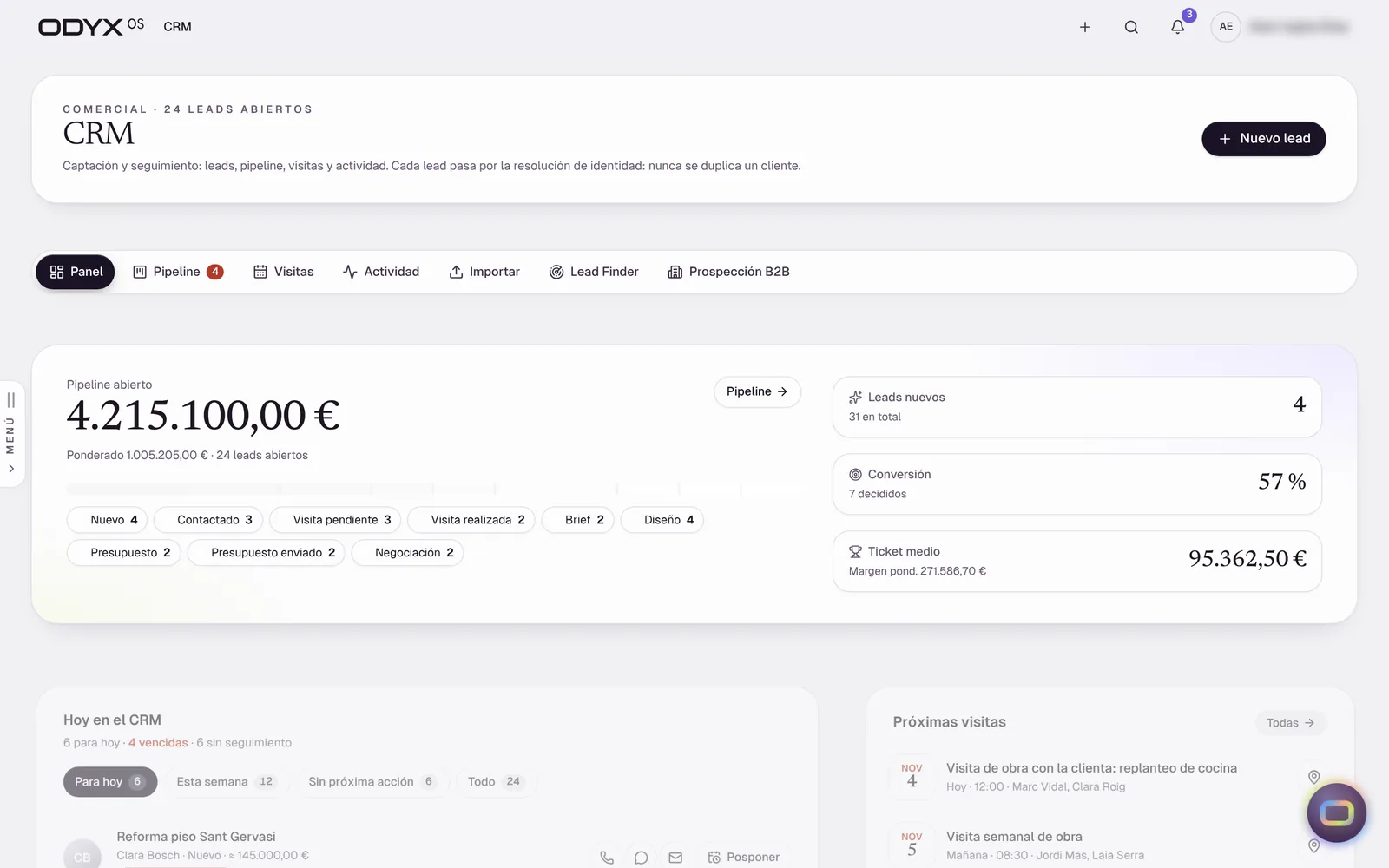
CRM panel with open pipeline value, conversion, visits and activity

Real interface · demonstration data · interface in Spanish

Leads & sales pipeline

Live

Every enquiry in one pipeline, with a daily “Today” list of who to call and what is due.

Solves: Enquiries scattered across phone, WhatsApp and email go cold.

  • Pipeline by stage with drag and undo
  • “Today” view with one-tap contact
  • Visits and activity history
  • Spreadsheet import of existing leads

Note: No inbound web-form or email-to-lead capture yet.

Proposed plan: Starter

Lead to project, without retyping

Live

A won lead becomes a client, a property and a project in one step — contacts are matched, not duplicated.

Solves: The same client is typed into three different tools.

  • Contact, client and property carried into the project
  • Duplicate detection and merge
  • One client record across every project
Proposed plan: Starter

Clients, contacts, companies & properties

Live

A clean directory with a 360° view of each client and property, and safe merging of duplicates.

Solves: Client history lives in people’s heads and inboxes.

  • Client and company records
  • Property records linked to projects
  • Merge with full traceability
Proposed plan: Starter

B2B prospecting by area

Beta

Find architects, agencies and businesses in the areas you work, and work them through a prospecting pipeline.

Solves: Commercial and trade partnerships depend on whoever you already know.

  • Search by zone and business type on a map
  • Prospecting pipeline with reasons for lost
  • CSV / company-register import
  • Area report

Note: Google Places mode needs a configured key; OpenStreetMap mode verified against a local test server.

Proposed plan: Business

Newsletters & landing pages

Beta

Write newsletters about finished projects and offers, review them, and publish a landing page.

Solves: Past clients and prospects never hear about your best work.

  • Editor with project templates
  • Review step before sending
  • Public landing page
  • Subscribers and unsubscribe

Note: Sending by email requires the email provider (Resend) to be configured; verified in demo mode.

Proposed plan: Business
Step 02 / 11

Visit the site

Photos, video, the recorded conversation, a sketch plan and a checklist captured on the first visit, so the estimate never starts from memory.

You getA client-ready visit dossier

  • 1Live
  • 1Beta
Sales & clients
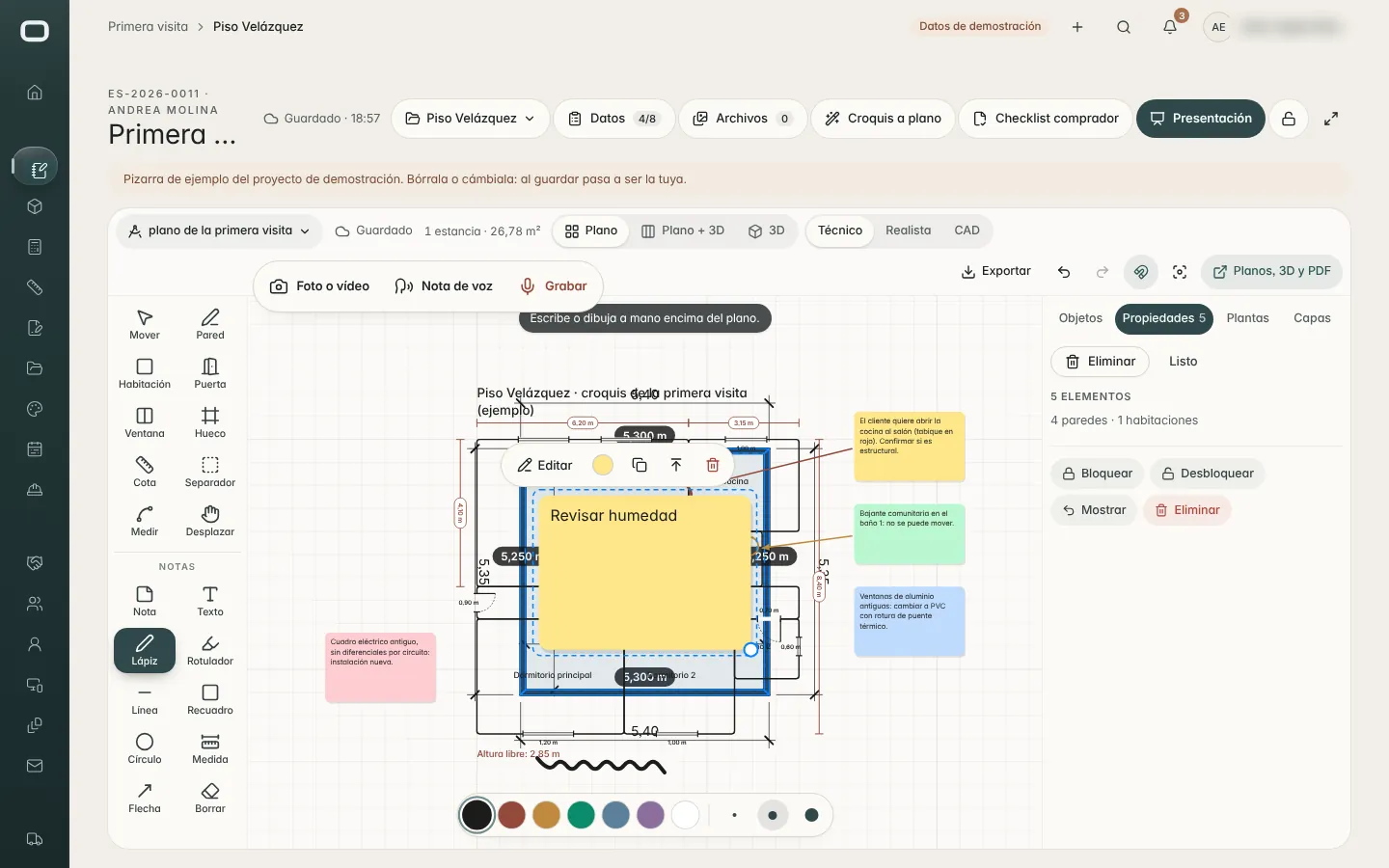
First visit board: sketch plan with notes, photos and voice notes for a renovation

Real interface · demonstration data · interface in Spanish

First site visit

Live

Capture the first visit properly: photos, video, recorded conversation, a quick sketch plan, a checklist and a client-ready dossier.

Solves: Notes from the first visit are incomplete, so the estimate starts from guesswork.

  • Visit board with media and notes
  • Recorded conversation upload
  • Quick plan from the sketch
  • Buyer / visit checklist and PDF
  • Client presentation

Note: The AI-written visit dossier needs a configured AI provider (rules fallback verified).

Proposed plan: Professional

Property research report

Beta

Research a property from its address — cadastral data, registry extract, building data — into a report.

Solves: Surprises about the property appear after the contract is signed.

  • Address search
  • Agent-assisted research
  • Additional report and single PDF

Note: Spain only (Catastro); live external data sources not validated in the audit environment.

Proposed plan: Business
Step 03 / 11

Survey & draw

Scan with an iPhone or iPad, or import a drawing. Correct it in the browser with parametric walls, rooms and live areas.

You getA measured plan with areas per room

  • 4Live
  • 1Beta
Scan3D & plans
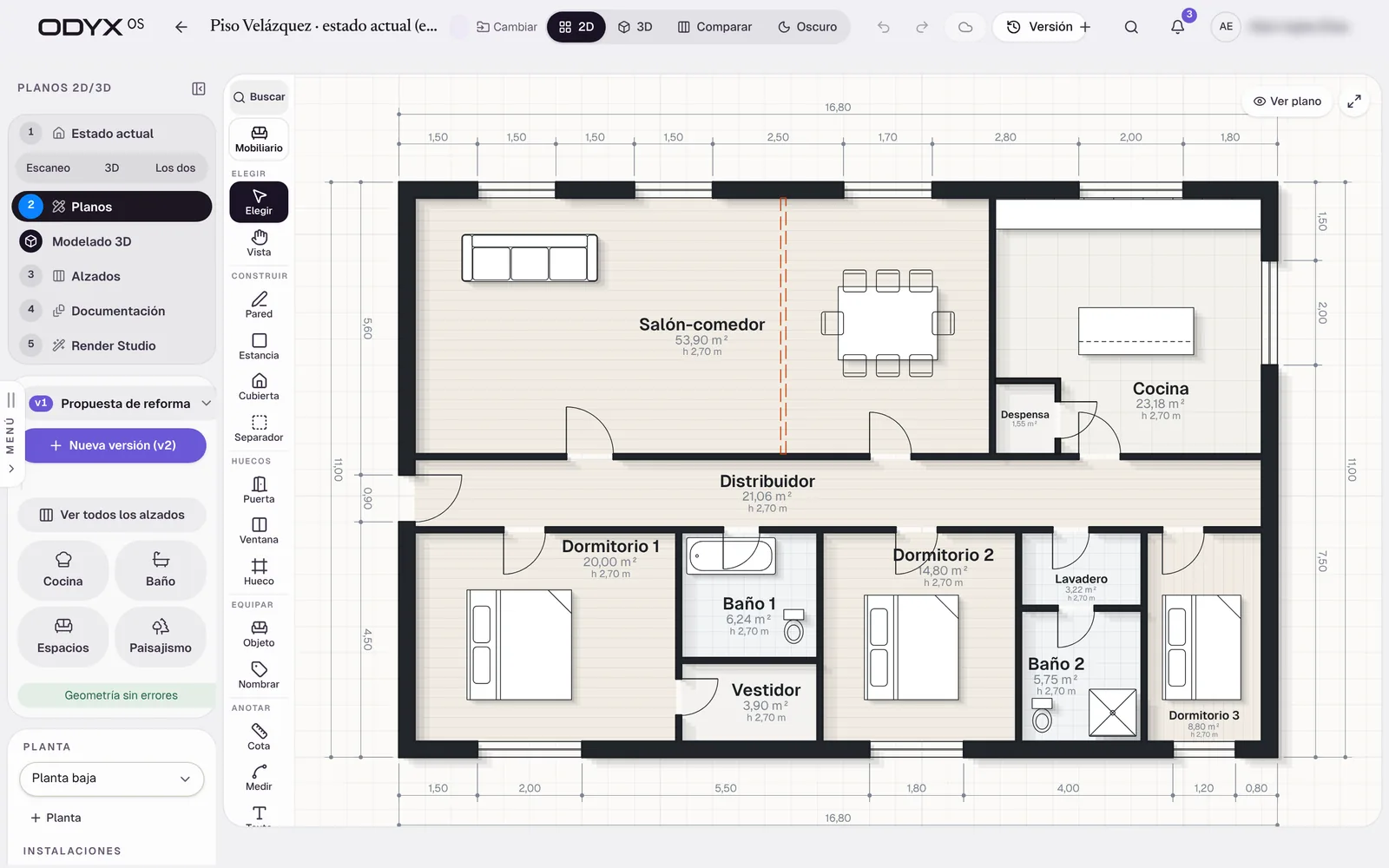
Plan editor with walls, rooms, areas and dimensions

Real interface · demonstration data · interface in Spanish

LiDAR capture with iPhone / iPad

Beta

Scan a space with an iPhone or iPad Pro; rooms, walls and openings arrive as an editable plan, with mesh and point cloud.

Solves: Measuring by tape takes hours and misses details.

  • RoomPlan capture import
  • Mesh and point cloud (LAS / GLB)
  • Measure in 3D
  • 360° photos

Note: Native app not yet tested on devices in the audit; a recent regression hides the scan button on new jobs (e2e 25).

Proposed plan: Professional

Import DXF, PDF or images

Live

Bring an existing drawing in as a scaled reference; walls are proposed from DXF files.

  • DXF import with wall proposal
  • PDF / image underlay with calibration

Note: DWG is not read natively (DXF is).

Proposed plan: Professional

2D plan editor

Live

Draw or correct plans in the browser: parametric walls, rooms with areas, doors, windows and symbols — Simple or Advanced mode, with touch support.

Solves: Survey drawings need CAD skills most renovation teams do not have.

  • Walls that join and move in parallel
  • Rooms with live areas
  • Dimensions and symbols library
  • Simple / Advanced modes
  • Phone and tablet drawing
Proposed plan: Professional

Measurements & quantities from the model

Live

Floor, ceiling, wall (gross and net), perimeter, openings and volume per room — exported or sent to the estimate.

  • Quantities per room and floor
  • CSV export
  • Space report PDF
  • Estimate by zone

Note: Reference quantities derived from the model, not certified site measurements.

Proposed plan: Professional

Existing vs proposal versions & comparison

Live

Keep the original survey, create proposal versions and compare them — demolition and new work shown.

  • Automatic “Original” version
  • Proposal versions v1, v2…
  • Comparison plan
Proposed plan: Professional
Step 04 / 11

Design

Kitchens and bathrooms designed inside the plan, interiors with selections and approvals, and title-blocked drawing sets with installation layers.

You getDrawing set: plans, elevations, sections, installations

  • 5Live
ODYX Studio
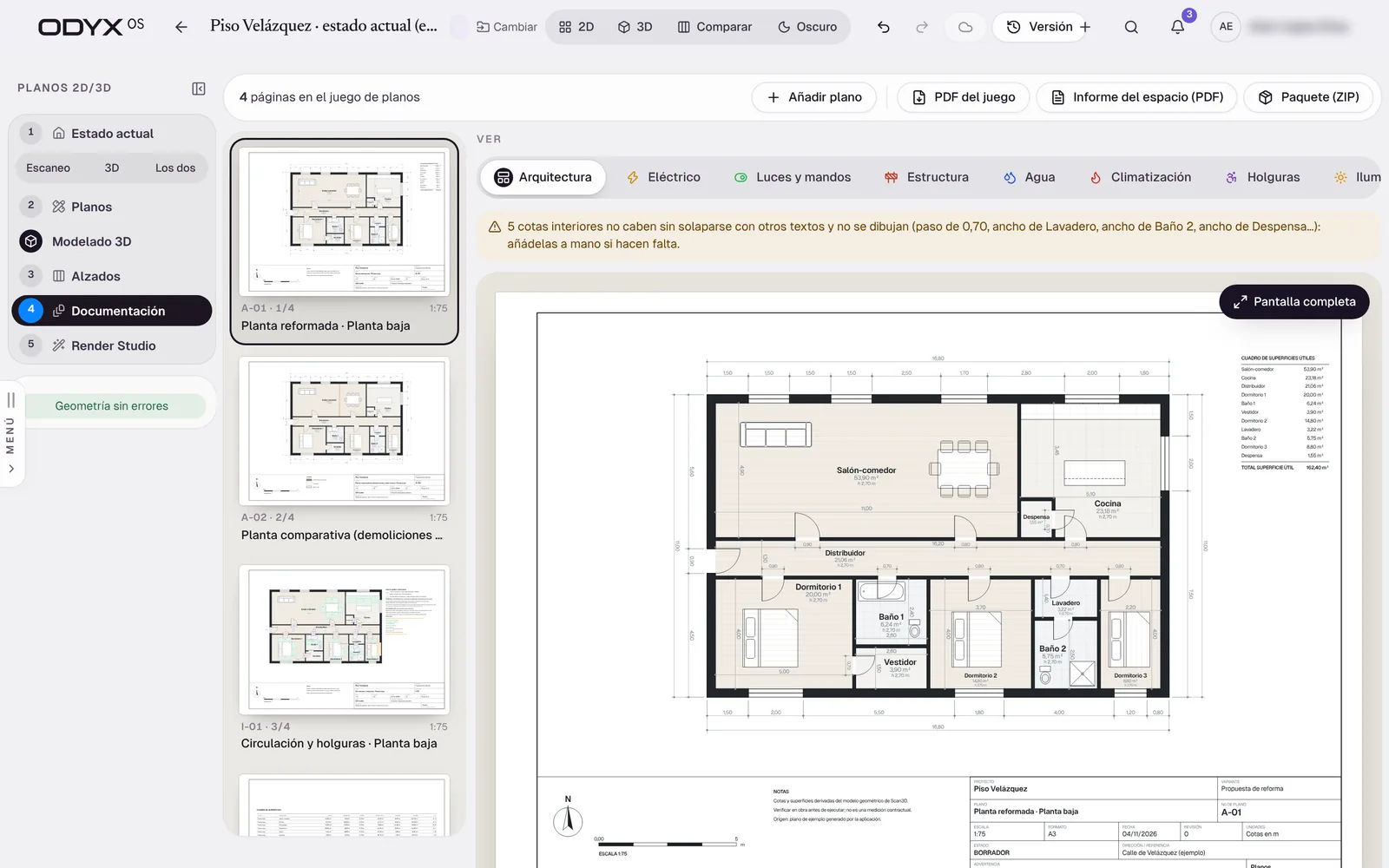
Drawing set with title block and installation layers

Real interface · demonstration data · interface in Spanish

Drawing sets: plans, elevations, sections & installations

Live

Title-blocked sheets for the existing state and the proposal — electrical, lighting, water, heating (incl. underfloor), structure and landscaping.

Solves: Renovation drawings are outsourced or skipped.

  • Plans, elevations, sections
  • Installations (MEP) layers
  • Landscape sheets
  • Area schedules
  • PDF set and ZIP package
Proposed plan: Studio

Kitchen & Bath Studio

Live

Design kitchens and bathrooms inside the plan: layouts, modules, worktops, finishes, elevations and 3D — written back to the plan and quantities.

Solves: Kitchen design happens in a separate tool and is re-typed into the estimate.

  • Linear, L, U, parallel and island layouts
  • Elevations with dimensions
  • Finishes and lighting
  • Back to the plan and the estimate

Note: Generic catalogue; manufacturer catalogues are not included.

Proposed plan: Studio

Interior design studio

Live

Moodboards (with an agent), inspiration boards, product library, web clipper, FF&E schedule, presentations and client approvals.

Solves: Selections are tracked in slides and spreadsheets.

  • Moodboards and editorial boards
  • Browser clipper to the library
  • FF&E per space with markup
  • Client approvals
  • Presentations

Note: Pinterest connection verified against a test server only.

Proposed plan: Studio

Building in its surroundings

Live

Place the property on the map, at its floor, with the neighbouring buildings and the real sun path.

  • Address search
  • City context from OpenStreetMap
  • Sun path by date and hour
Proposed plan: Studio

CAD & BIM exports

Live

Export to PDF, DXF, IFC (BIM), GLB/glTF, OBJ, STL, USDZ and PLY.

  • DXF and PDF
  • IFC
  • 3D formats for other tools

Note: No native DWG export.

Proposed plan: Professional
Step 05 / 11

Visualise

The plan becomes a 3D model instantly. Walk through it, light it, and render realistic images on your own graphics card.

You get3D model, renders and read-only links

  • 2Live
  • 2Beta
ODYX Studio
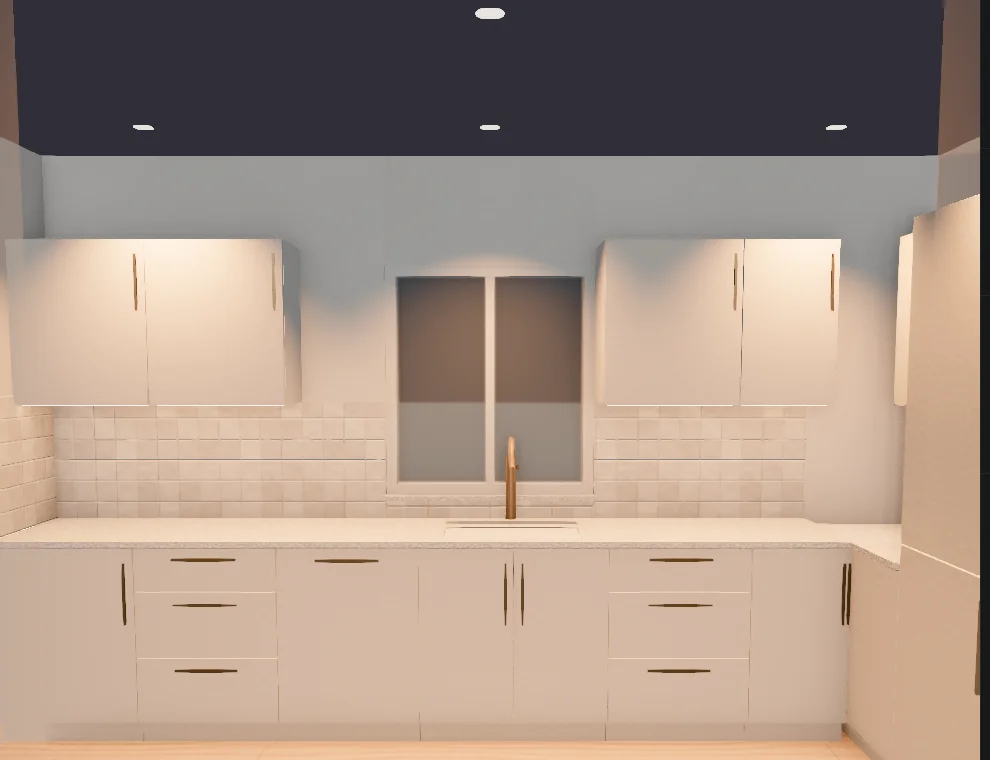
Kitchen rendered with golden-hour lighting in ODYX Studio

Real interface · demonstration data · interface in Spanish

3D model, walkthrough & VR

Live

The plan becomes a 3D model instantly: dollhouse, perspective, walk-through, floors, roofs and timber structure.

  • Dollhouse and perspective views
  • Floors, roofs and structure
  • Sun and time of day
  • WebXR VR mode

Note: VR not yet tried on a headset.

Proposed plan: Professional

Realistic rendering studio

Beta

Physically based materials, photometric lighting, physical cameras and a path tracer — rendered on your own computer’s graphics card.

Solves: Photorealistic images cost days and an external visualiser.

  • PBR materials at real tile size
  • Lighting scenarios (daylight, golden hour, night…)
  • Physical camera and composition guides
  • Material from a photo

Note: WebGPU-only views; image quality on real graphics hardware still to be benchmarked.

Proposed plan: Studio

AI images from plans and 3D

Beta

Generate styled images and isometrics from the project’s own plan or 3D view.

  • Realistic AI from the 2D plan
  • Isometric thumbnails
  • Style variations

Note: Requires an AI image provider; output fidelity not yet measured.

Proposed plan: Studio

Read-only drawing links

Live

Share plans and 3D with clients or partners through a read-only link.

Proposed plan: Professional
Step 06 / 11

Estimate

Quantities come from the model, prices from your own library. Start from a template or a previous job, or let the estimating agent draft it.

You getAn estimate with the source of every figure

  • 5Live
  • 1Beta
Estimating & pricing
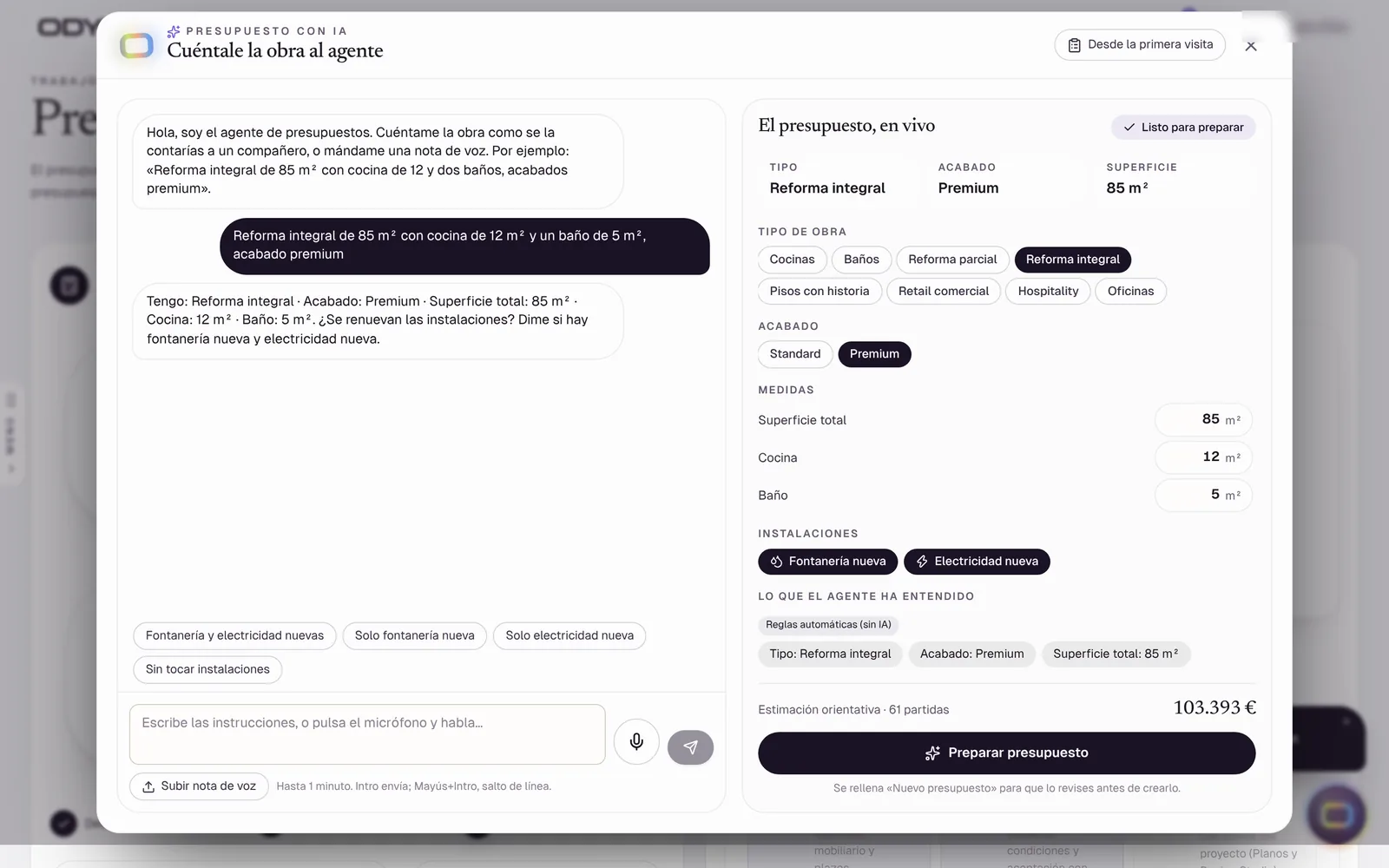
AI estimating agent drafting a renovation estimate from a conversation

Real interface · demonstration data · interface in Spanish

Estimates in four ways

Live

Start an estimate from a template, with AI, from a blank sheet or from a previous job — and edit it directly.

Solves: Every estimate starts from an old spreadsheet.

  • Visual templates by type of work (kitchens, bathrooms, full renovations…)
  • Library of line items
  • Estimates by zone from the plan
  • Trash with undo and restore
Proposed plan: Starter

AI estimate from a description, a visit or your voice

Beta

Describe the job — or point to the first visit — and the estimating agent asks what is missing and drafts the estimate from your library.

Solves: Estimating eats evenings and weekends.

  • Agent asks one question at a time
  • Shows the source of each figure
  • Voice editing of an estimate
  • Train with your past estimates

Note: Live AI models not verified in the audit environment (no key); the rules-based fallback is verified.

Proposed plan: Professional

Measurements & takeoff

Live

Measure DXF and PDF drawings, convert systems into materials by lots and send quantities to the estimate.

Solves: Quantities are measured twice, by hand.

  • Calibrated DXF / PDF sheets
  • Systems → materials by lots
  • Zone agent breaks a room into work items
  • Export
Proposed plan: Professional

Design to estimate

Live

Measure the saved design and add the marked lines to the estimate — without duplicating on repeat.

Proposed plan: Studio

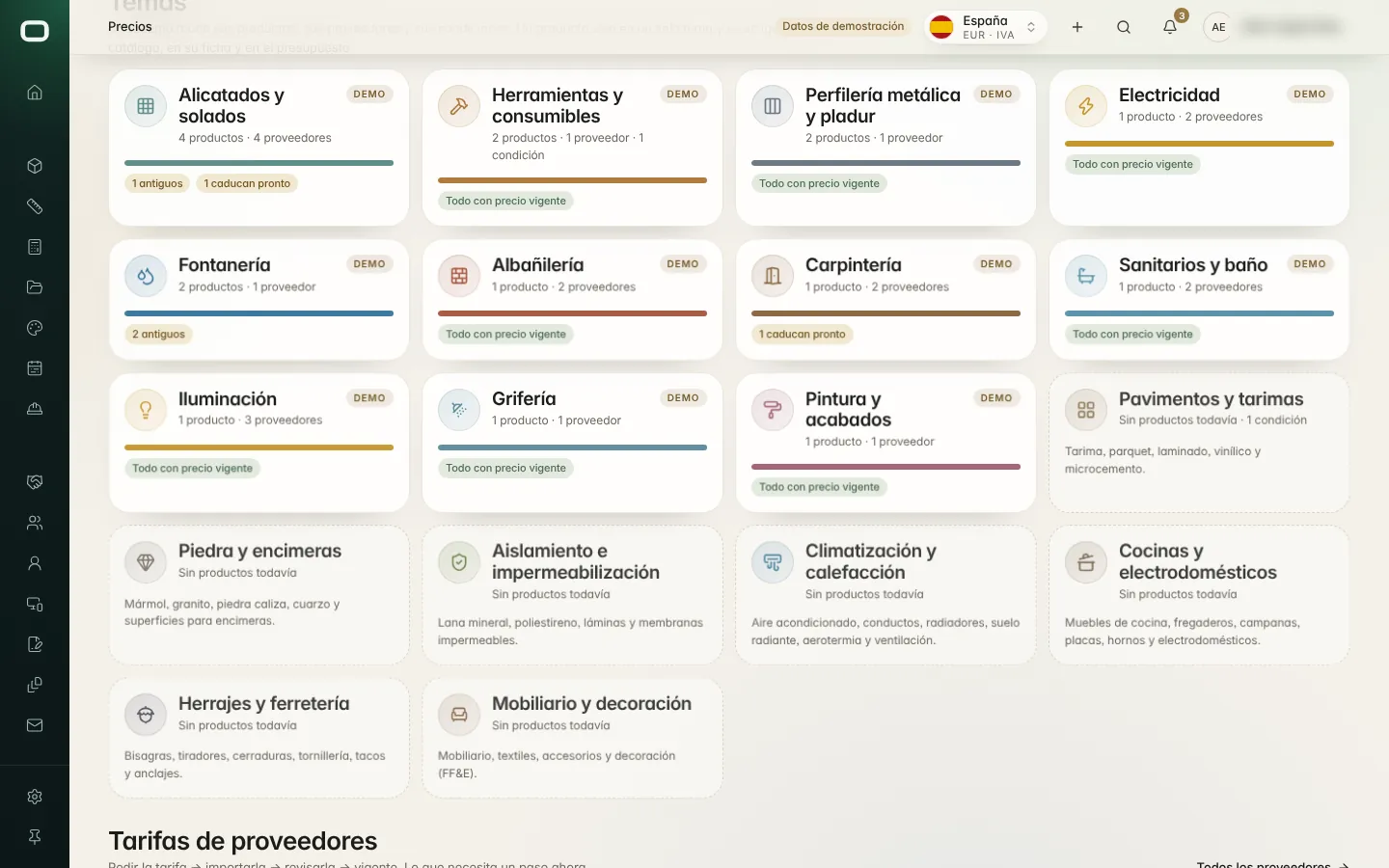
Price library & supplier tariffs

Live

Every product and material with its best current price and where it came from — tariffs imported, expiries flagged.

Solves: Estimates use prices nobody can trace or that expired months ago.

  • Prices organised by topic
  • Supplier tariff import (paste or file)
  • Expired / unconfirmed price warnings
  • Buying agent finds the best price per material

Note: Market price research by AI requires a configured provider.

Proposed plan: Professional

Client quotes, PDFs & internal analysis

Live

A clean client quote and PDF, with a separate internal analysis of cost, margin and markup.

Solves: Margins leak because internal costs end up in front of the client — or are not visible at all.

  • Client quote preview and PDF with your branding
  • Internal analysis view
  • Costs and margins hidden from roles without permission
Proposed plan: Starter
Step 07 / 11

Propose & sign

Send a frozen proposal the client approves online. Approval sets the contract baseline — immutable.

You getA signed contract and a fixed baseline

  • 3Live
  • 1Beta
Sales & clients
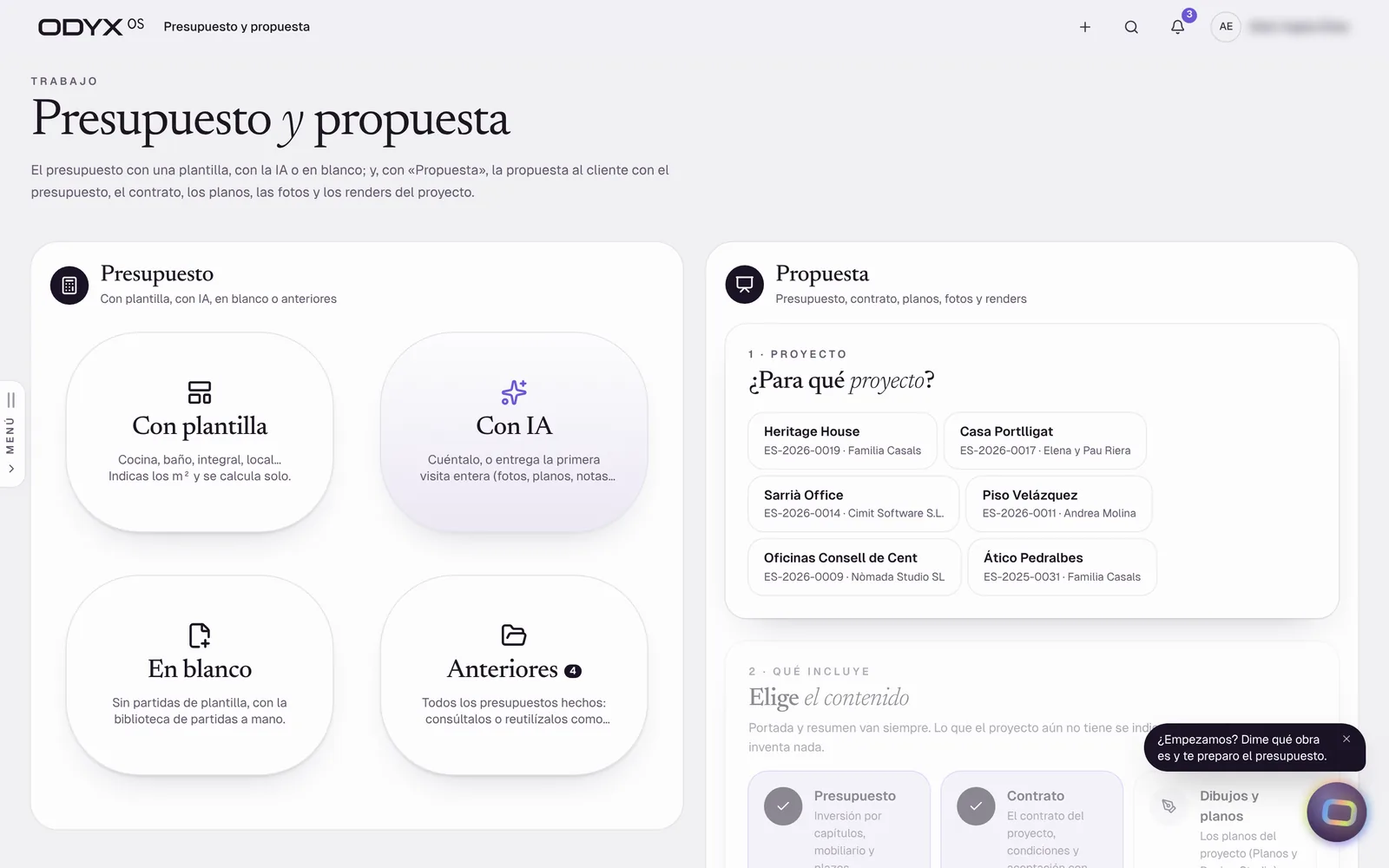
Estimate and proposal launcher: template, AI, blank or previous, and the proposal builder

Real interface · demonstration data · interface in Spanish

Proposals with online approval

Live

Send a frozen proposal through a secure link; when the client approves, the project and its contract value are set automatically.

Solves: Quotes change after they are sent and nobody knows which version was accepted.

  • Frozen proposal versions
  • Secure client link (tampered links refused)
  • Approval activates the project
  • Approved proposal PDF
Proposed plan: Starter

Proposal brochures

Beta

Turn parts of a project — budget, plans, renders — into a designed presentation for the client.

Solves: Good work is presented in a plain spreadsheet.

  • Choose what the proposal includes
  • Branded document from project parts

Note: An error reported on the deployed site has not been reproduced locally and is under investigation.

Proposed plan: Professional

Client portal

Live

Clients sign in to see progress, photos, documents and notes, and to sign their contract — only their own project.

Solves: Clients chase updates by phone and messages get lost.

  • Client login with own password
  • Progress, photos and documents
  • Contract signing (simple electronic acceptance)
  • Team preview of the client view
  • WhatsApp link

Note: No online payments and no qualified e-signature yet; selections approval is partial.

Proposed plan: Starter

Contract library & e-signing

Live

Construction contract templates with their legal basis, an editor, PDF, and signing by the client from an email link or the portal.

Solves: Works start on a handshake or an outdated template.

  • Template library with legal references (Spain)
  • Clause editor
  • PDF in your brand
  • Signature link by email; signing in the portal

Note: Simple electronic acceptance; qualified e-signature is not integrated.

Proposed plan: Professional
Step 08 / 11

Plan & build

Every project on one timeline. Site notes, photos and clock-ins arrive from the phones of the people doing the work.

You getA live programme and a site record with author and time

  • 6Live
  • 1Beta
Projects & site
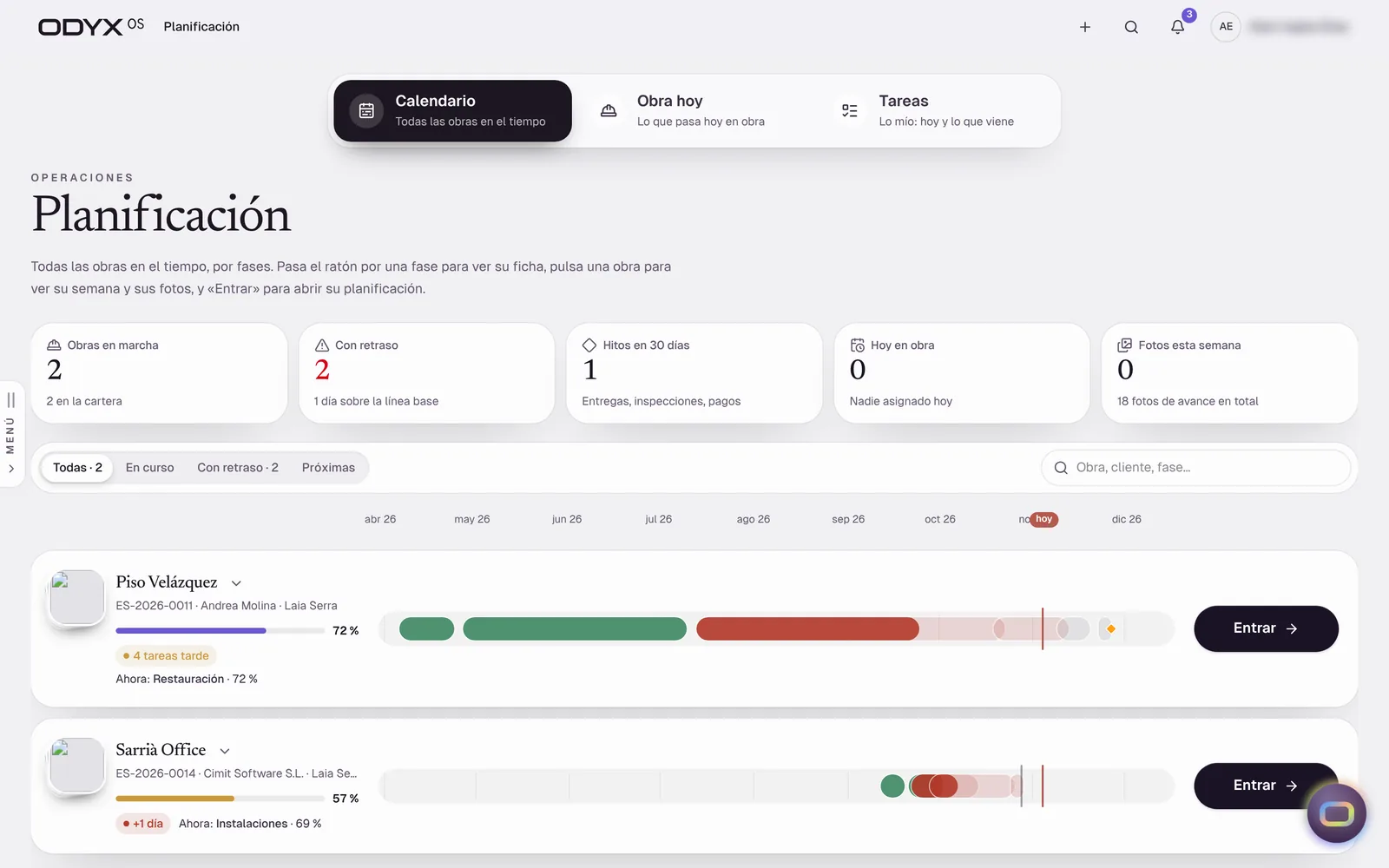
Planning: every project on a timeline with phases, delays and progress

Real interface · demonstration data · interface in Spanish

Project workspace

Live

Each project with its phases, sections, activity and every linked record — estimate, proposal, contract, purchases, plans.

Solves: Project information is split across folders and apps.

  • Phases with the current one highlighted
  • Sections grouped by stage
  • Activity log
  • Trash with restore (blocked when finance records exist)
Proposed plan: Starter

Planning, calendar & task board

Live

Portfolio calendar, “today on site”, a timeline with photos over time, and a task board with “my tasks”.

Solves: Nobody has the same view of who is where this week.

  • Calendar and phase timeline
  • Photos shown over time
  • Task board with checklists, labels, priority, @mentions
  • Dependencies and baselines

Note: Drag-to-edit Gantt and critical path are not built.

Proposed plan: Professional

Site notes with photo, audio & dictation

Live

Operatives send material requests, issues and notes from their phone; the site manager reviews and approves.

Solves: Site requests arrive as voice notes nobody can find later.

  • Material request, issue or note
  • Photo and audio
  • Dictation
  • Site manager review and notification

Note: Works online; offline drafts are planned.

Proposed plan: Starter

Site diary, issues, snags & checklists

Beta

Daily log, issues, snag list and simple checklists per project.

  • Daily diary
  • Issues and snags
  • Checklist items

Note: No configurable form builder or template library yet; online only.

Proposed plan: Professional

ODYXOS Go mobile app

Live

An installable phone app for the field: clock-in, site notes, the site view, receipts, quick estimates, client view and ORA.

Solves: Field teams will not use office software on a phone.

  • Install from the browser (iPhone and Android)
  • Clock-in with offline queue
  • Notes, receipts, site, estimate

Note: Offline only for clock-ins.

Proposed plan: Starter

GPS time clock & timesheets

Live

Operatives clock in and out with a username and PIN, with location — even without signal — and timesheets go for approval.

Solves: Paper timesheets and disputed hours.

  • Clock in/out with GPS
  • Offline queue for clock-ins
  • Timesheet approval
  • Who is on site now
Proposed plan: Starter

Team & HR

Live

Trades with their people and today’s status, worker files, absences and holidays, payslips with PDF, and hiring.

Solves: HR lives in a drawer and a spreadsheet.

  • Worker file with tabs and photo
  • Holiday and absence requests and approval
  • Payslips (PDF)
  • Hiring pipeline with legal model, contract and onboarding

Note: No payroll-software integration yet.

Proposed plan: Professional
Step 09 / 11

Buy & supply

Requests, orders, site receipts and supplier invoices are checked against each other before you pay — and committed cost moves the margin the moment you buy.

You getCommitted cost and matched supplier invoices

  • 1Live
  • 1Beta
Purchasing & suppliers
Price topics board with supplier tariffs and their validity

Real interface · demonstration data · interface in Spanish

Purchasing with three-way match

Beta

Purchase requests, quotes, orders, site receipts and supplier invoices — checked against each other before paying.

Solves: Paying for materials that never arrived, or at a different price.

  • Requests → quotes → orders → receipts
  • Supplier invoice matching (order / receipt / invoice)
  • Double approval above a threshold
  • Discrepancy flags

Note: Logic verified by checks; browser tests only open the screens. Estimate-line → purchase automation not built.

Proposed plan: Professional

Suppliers & product library

Live

Suppliers with their terms and contacts, and a product library with manufacturer, reference, finish, price and lead time.

Solves: Supplier conditions live in old emails.

  • Supplier records and conditions
  • Product records
  • Tariff request log
Proposed plan: Professional
Step 10 / 11

Invoice & control

Contract value, variations, cost and forecast in one economic position. Invoicing refuses to bill above the contract.

You getInvoices, collections and a margin you can trust

  • 4Live
  • 4Beta
Finance & contract economics
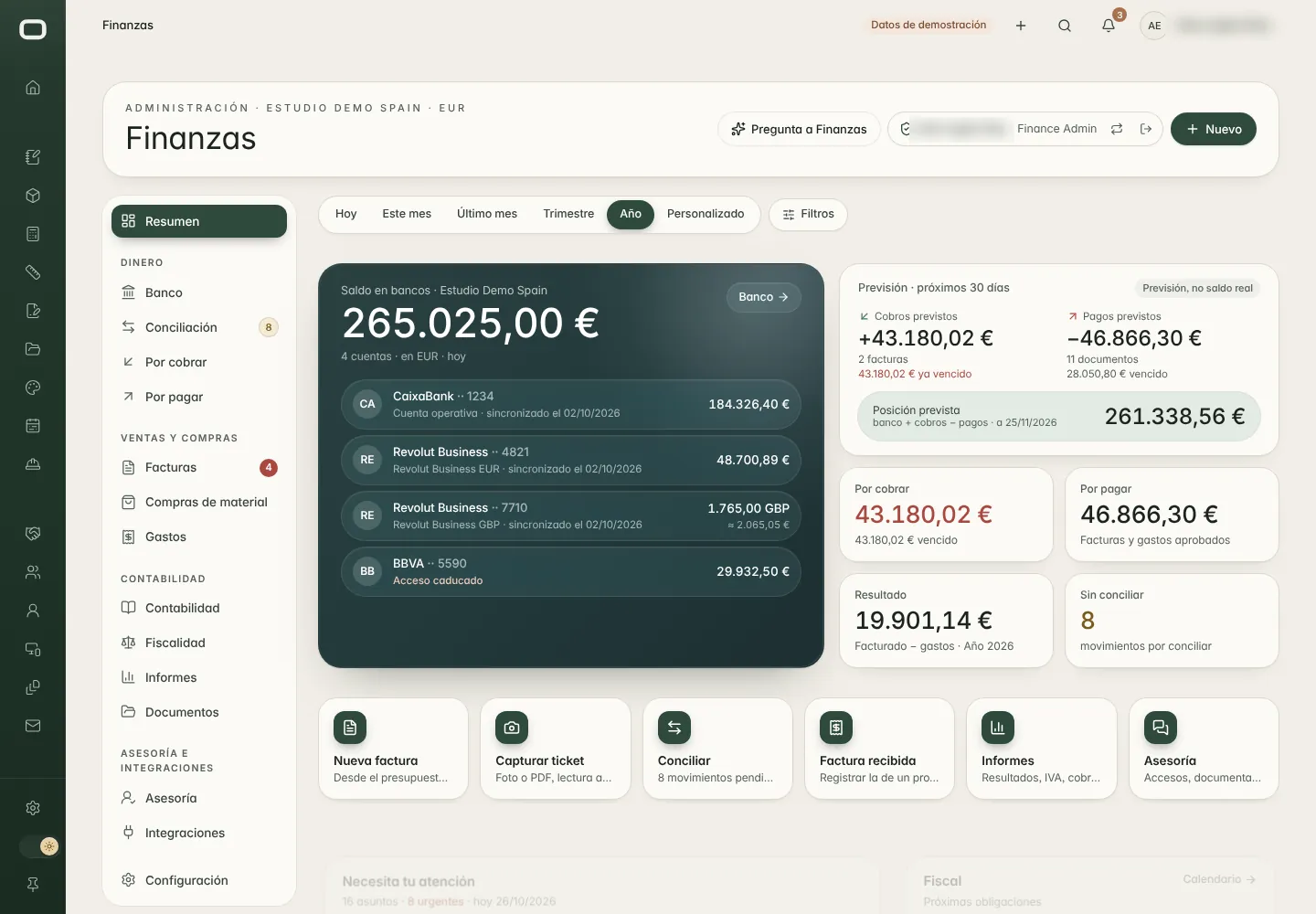
Finance overview: bank balance, cash forecast, receivables and payables

Real interface · demonstration data · interface in Spanish

Contract baseline & project economics

Live

One economic truth per project: contract value, approved variations, committed and actual cost, forecast and margin.

Solves: Margins are discovered after the job is finished.

  • Baseline created at proposal approval and never rewritten
  • Forecast at completion and margin
  • Same figures in every module
Proposed plan: Professional

Variations (change orders)

Live

Every change is recorded, approved and added to the contract ledger — the original contract is never overwritten.

Solves: Extras are done on site and never charged.

  • Variation approval
  • Contract ledger by version
  • Pending client decisions
Proposed plan: Professional

Invoicing with built-in safeguards

Live

Invoices and credit notes numbered correctly per company, series and year — and the system refuses to invoice above the contract value.

Solves: Numbering mistakes and over-invoicing create tax and client problems.

  • Numbering per legal entity, series and year
  • Invoicing cap at current contract value (server-side)
  • Credit notes restore the balance
  • Spain (IVA) and UK (VAT) entities
Proposed plan: Starter

Collections tracking

Beta

What is owed, what is overdue and what has been confirmed by both the bank and your accounting programme.

Solves: Late payments are noticed too late.

  • Pending, overdue and to-confirm views
  • Cross-check bank vs accounting
  • Reminders to send

Note: The automatic reminder run has no scheduler yet; live bank and accounting connections not validated.

Proposed plan: Professional

Expenses, received invoices & receipt capture

Beta

Photograph a receipt or upload a supplier invoice; it is read, checked and allocated to the project.

Solves: Receipts pile up in vans and pockets.

  • Camera / PDF capture from the mobile app
  • Tax ID validation
  • Allocation to project or general expense
  • Review and approval

Note: Automatic reading needs an AI provider; one review step currently fails in the browser test (e2e 16).

Proposed plan: Professional

Bank connection & reconciliation

Beta

Bank movements matched with invoices and payments, with one-click undo.

Solves: Reconciliation is a monthly chore for the bookkeeper.

  • Open-banking connection (Enable Banking)
  • Suggested matches
  • Undo on every reconciliation

Note: Reconciliation logic verified; live bank connection not validated.

Proposed plan: Business

Accounting connections: Holded, Xero, QuickBooks

Beta

Issued and received invoices sent to your accounting programme once, with conflict detection.

  • Holded (Spain)
  • Xero (UK)
  • QuickBooks
  • Test mode simulator

Note: Live accounts not validated; Verifactu mode not validated live.

Proposed plan: Business

Business dashboard

Live

Pipeline, workload, forecast margins, cash and projects at risk on one executive page.

Solves: The owner only sees the business clearly at year end.

  • Executive KPIs
  • Combined charts
  • Projects needing attention
Proposed plan: Professional
Step 11 / 11

Hand over

Handover records, warranties and the documents of the job in your brand — and your accountant gets a portal of their own.

You getHandover file, warranties and accountant-ready records

  • 3Live
  • 1Beta
Documents & compliance
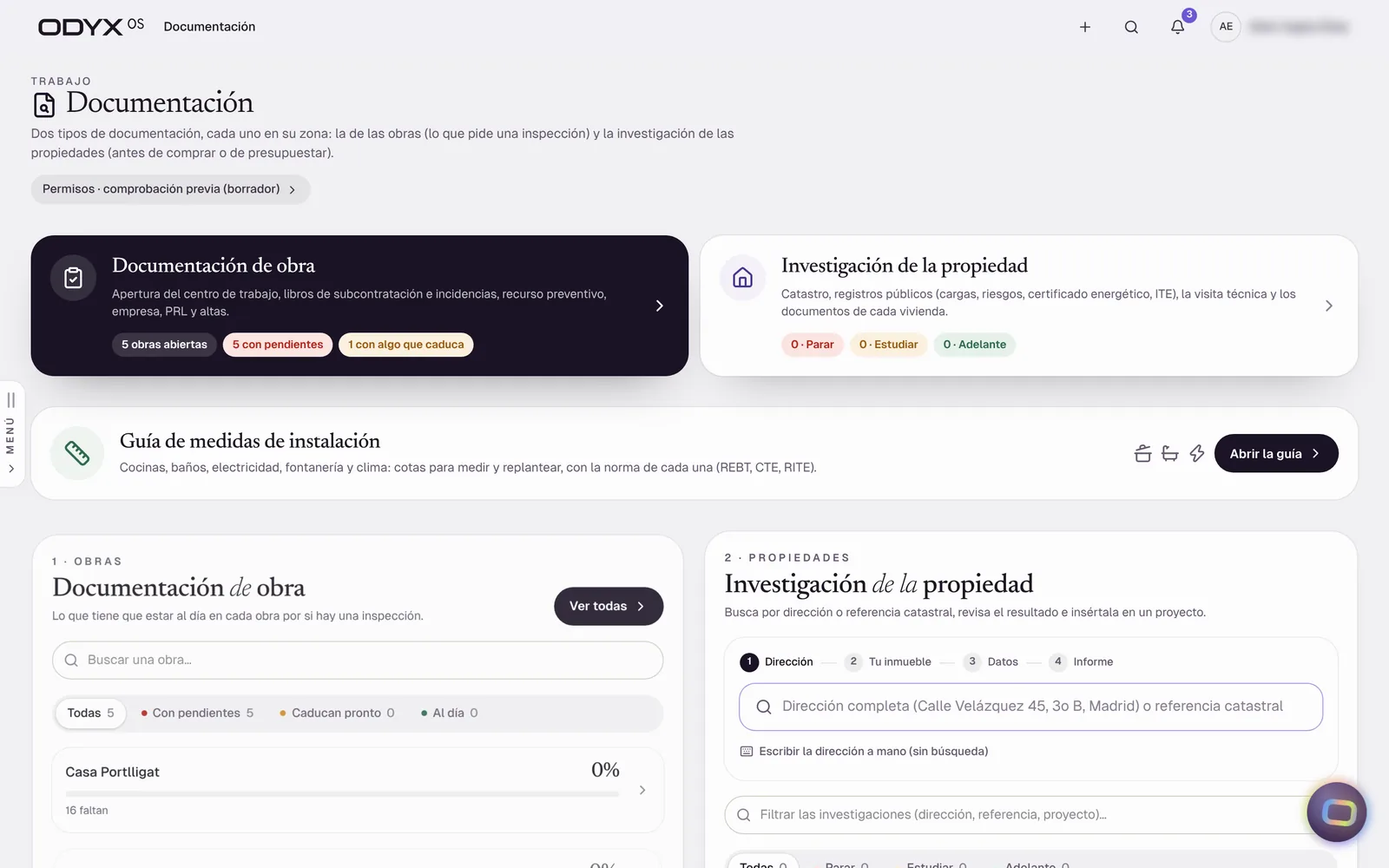
Documentation: site documentation, property research and installation measurement guide

Real interface · demonstration data · interface in Spanish

Handover & warranties

Beta

Handover records and warranty tracking per project.

  • Handover checklist
  • Warranty records

Note: Not covered by the browser test suite.

Proposed plan: Professional

Document studio

Live

Branded documents from templates — with your logo and typography — to preview, present, print or share by link.

Solves: Every document looks different and is rebuilt each time.

  • Template library and brand kit
  • Present, print and share links
  • AI-assisted drafting (with provider)
Proposed plan: Starter

Site administration documents

Live

Opening of the work centre, subcontractor records, incident book and document expiries for each site (Spain).

Solves: An inspection finds an expired document.

  • Per-site document checklist with expiries
  • Subcontracting book
  • Incident book PDF
  • Subcontractor documents

Note: Content follows Spanish requirements.

Proposed plan: Professional

Portal for your external accountant

Live

Invite your accountant to a dedicated portal to download records, ask questions and receive answers.

Solves: Quarter-end means emailing folders of PDFs.

  • Invitation by link
  • Records and PDFs by entity
  • Export
  • Questions and answers
Proposed plan: Business

Every feature marked Live has been verified in the current build with demonstration data. Accounts for customer companies are opened through the early-access programme while production sign-in and durable data storage are completed. Availability & roadmap

See your next project run from A to Z.

A 45-minute walkthrough with the team that builds it — from first visit to final invoice, on a real renovation example.
Early access · Spain & UK